
Make any film,
on any topic.
No camera.
Tenet is a Mac app for making films with AI. Plan on a canvas, generate every shot, voice and score with the best models, and cut it on a real timeline. Or tell the agent what you want, and it does all three.
Every shot in this reel was generated in Tenet. Each clip is labeled with the model that made it. Drag the timeline to scrub.
Say what happens.
Get the shot.
Real generations from real Tenet projects, beside the prompt that made them. They're shown as they were typed, typos included.
Plan it, make it, cut it.
Same window.
No exporting between tools. A shot you generate on the board is already in the edit, and the agent can see both.
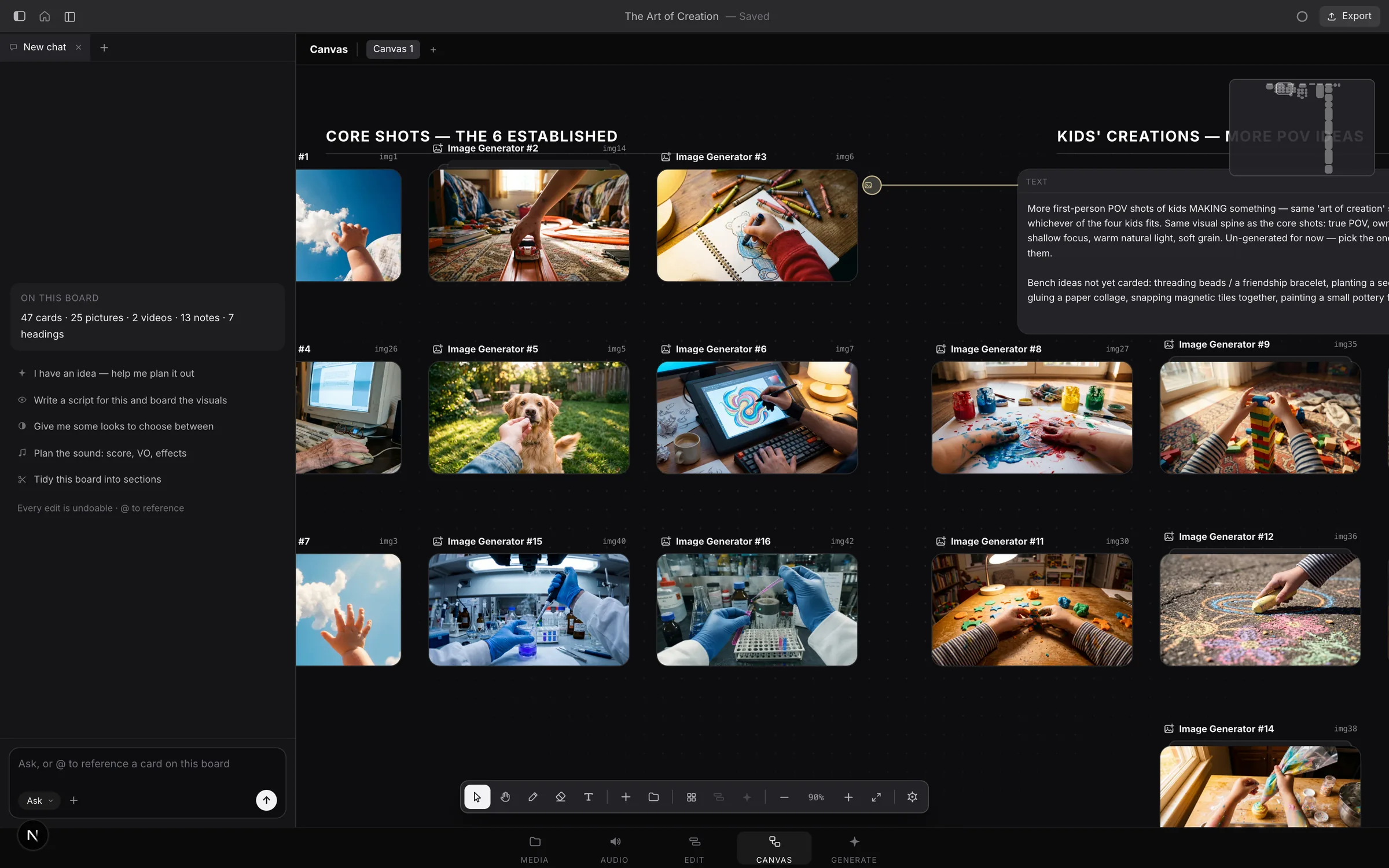
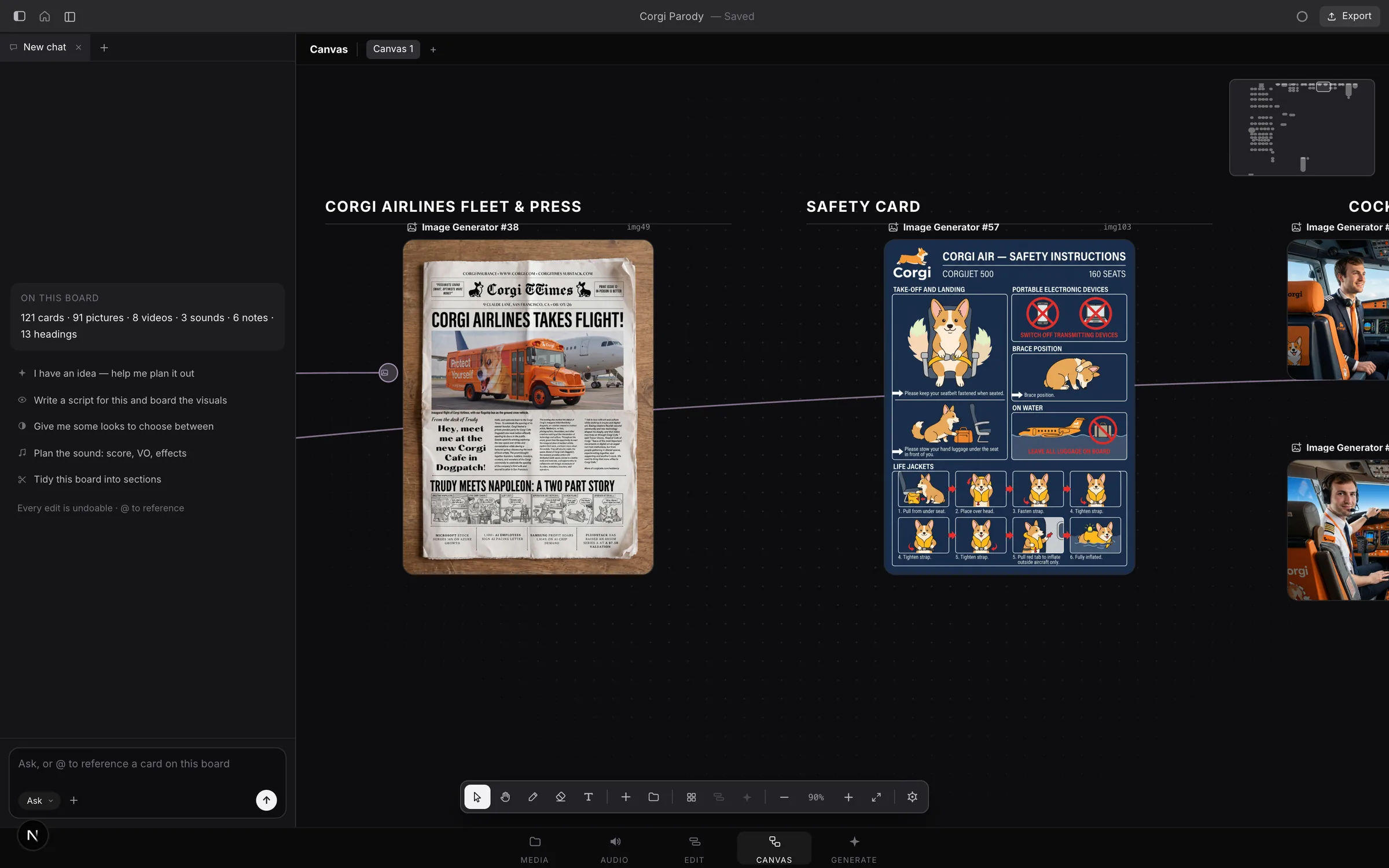
An endless board for the whole film. Scripts, references, characters and shots sit side by side, wired together so a shot knows its start frame, its reference and its words. Every generation lands on the board as a card, and every take is kept.
From the project The Art of Creation: 47 cards in sections, from concept to script.
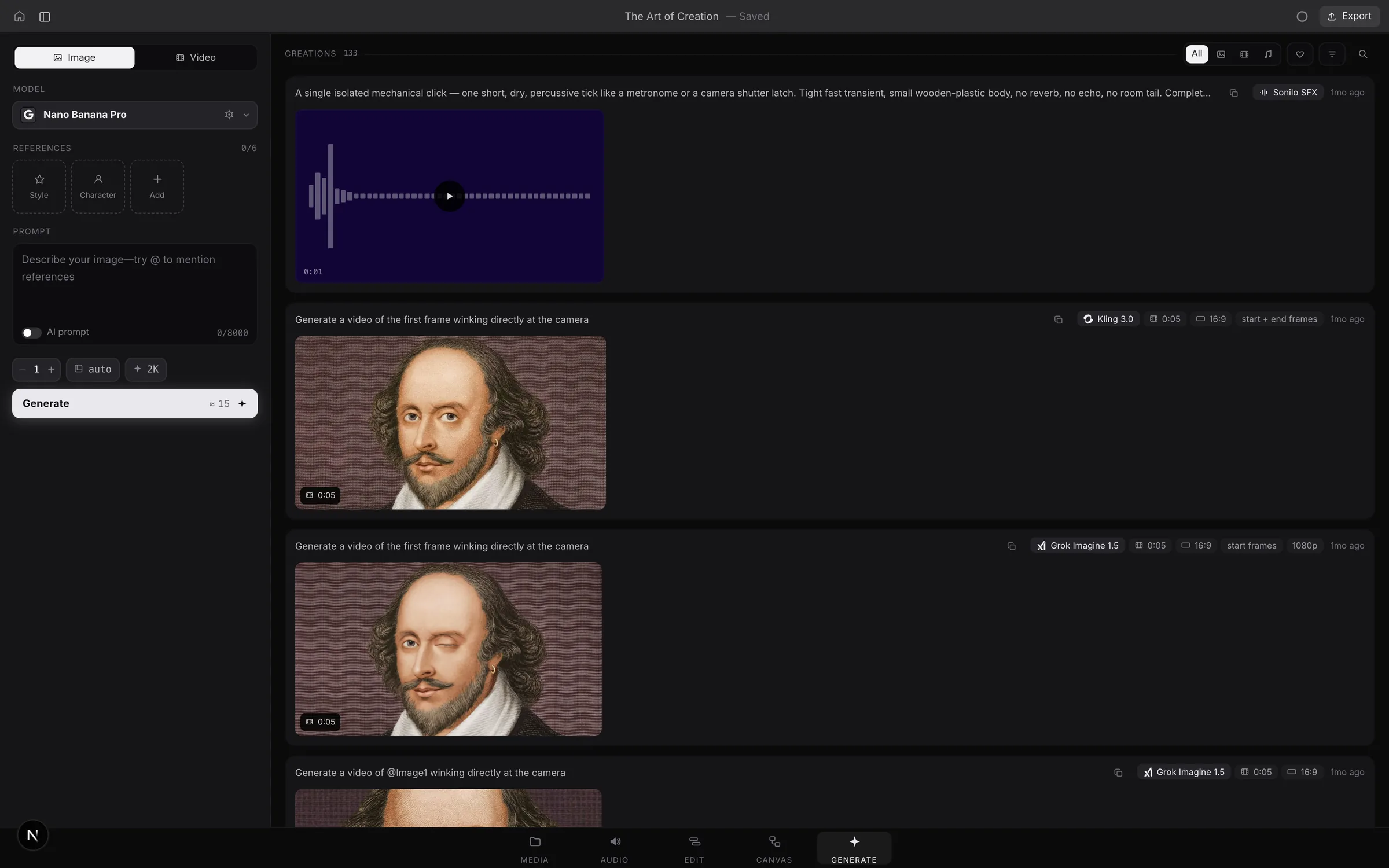
Every model in one feed. Pick a model, describe the shot, drop in a start frame or a reference. Each result keeps its prompt and settings, so the good one is easy to make again, or to try on another model.
The same prompt and portrait, run on Kling 3.0 and on Grok Imagine 1.5.
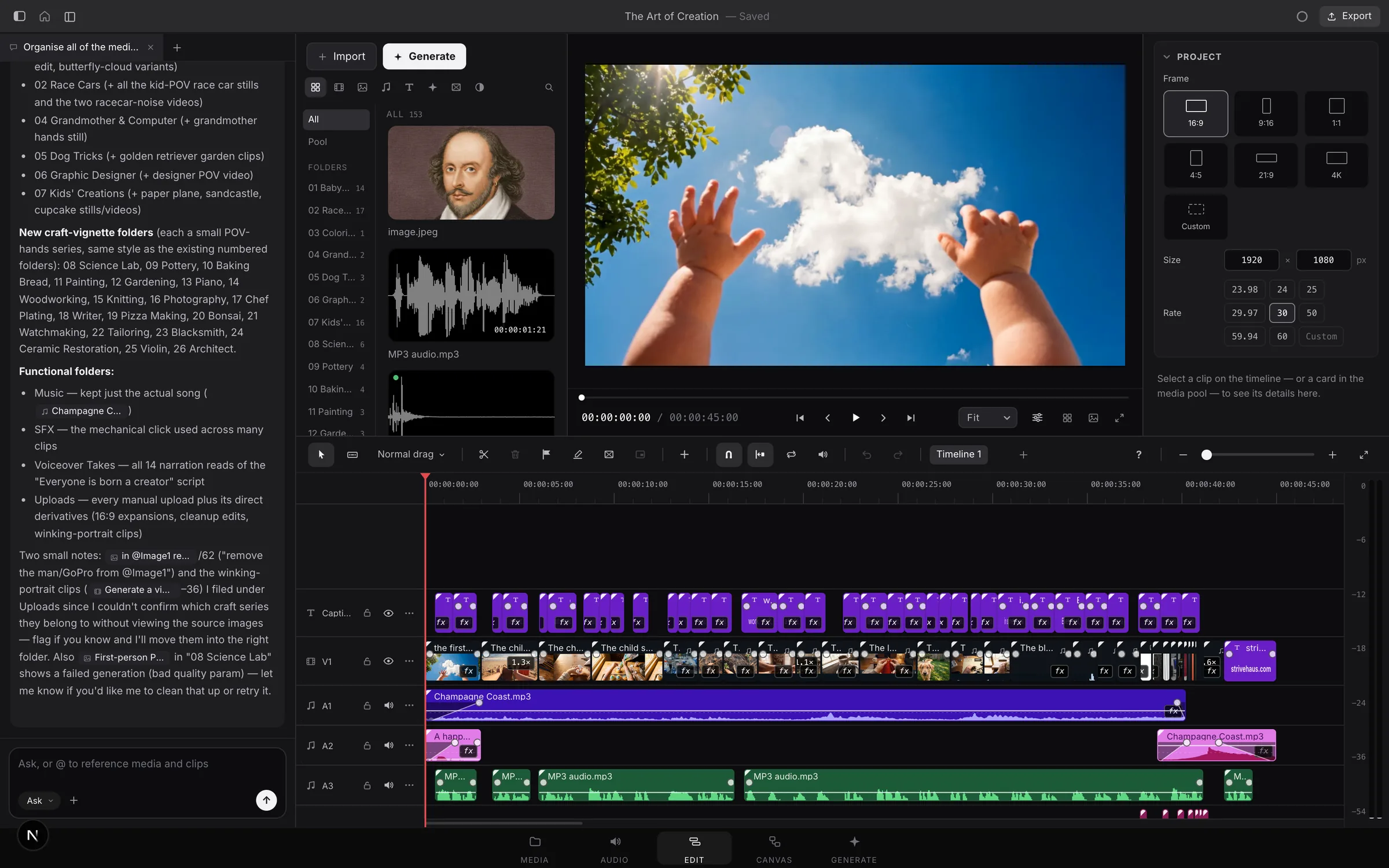
A real timeline, not a clip stitcher. Tracks, titles, captions, keyframes, color and sound, with everything you've generated already waiting in the media pool, filed into folders.
The Art of Creation on the timeline: 45 seconds of captions, picture, music and voice.
Tell it what you want.
It does the work.
The agent reads your timeline, watches your footage and uses the same tools you do. Anything it changes, you can undo.
- You
Analyze the clips and generate a soundtrack to match the vibe. It should be dark, gothic, and maybe somewhat orchestral.
- Read timelineRead mediaAdded a trackGenerate music
- Tenet
Here's what I'm working with: sheep scattering in a panic, a wolf stalking through a burning forest, a nun backing away from the camera. That's a dark, ritualistic narrative. I'll generate a dark, gothic orchestral soundtrack: deep strings, ominous brass, pipe organ undertones, and a building tension that fits the 12-second runtime.
- You
Generate another track, but make it a little bit more pacey. At each point where there is a scene change from one clip to the next, make sure that there is a beat drop or an increase in base or something to match up to that.
- Tenet
The two scene changes happen at frame 92 (0:03.1), sheep to wolf, and frame 243 (0:08.1), wolf to nun. I'll call out those timestamps in the prompt so the music hits those moments. It'll land on track A2 when it's ready.
- Ask
- Checks with you before anything is generated. This is where it starts.
- YOLO
- Generates and edits on its own. Only deleting still asks.
- Plan
- Looks into it and writes a plan. Changes nothing, spends nothing.
Start with nothing
but the idea.
Say “make me a film about…” and the agent runs it like a director with a crew. You sign off before a single shot is generated.
It asks
A few quick multiple-choice questions about the film you have in mind.
It boards
Brief, look, script, characters, locations, scenes and shots, laid out on the canvas.
It checks
The script is read against the shots, word by word: spoken pace, who's where, how long it runs.
You approve
Nothing is generated until you've seen the plan. These checkpoints hold even when it runs on its own.
It shoots
Character and location sheets first, so every shot is made from the same faces and places.
It cuts
The takes go on the timeline in order, with voice, music and sound effects mixed to level.
63 models.
One balance.
Pick the model that suits the shot, or let the agent pick. They all draw on the same credits. No extra accounts, no keys, no tabs.
Video 22
- Seedance 2.5
- Seedance 2.0
- Seedance 2.0 Fast
- Seedance 2.0 Mini
- Kling 3.0 Pro
- Kling Avatar 2.0 Pro
- Kling Avatar 2.0
- Veo 3.1
- Veo 3.1 Fast
- Veo 3.1 Lite
- Wan 3.0
- Wan 2.2 Speech to Video
- MiniMax H3
- MiniMax H3 Max
- Grok Imagine 1.5
- Gemini Omni Flash 1.1
- OmniHuman 2
- OmniHuman 1.5
- InfiniteTalk
- Fabric 1.0
- Motion Transfer
- Object Swap
Image 19
- Nano Banana Pro
- Nano Banana 2.1
- Nano Banana
- GPT Image 2.5
- GPT Image 2.5 Sunburst
- GPT Image 2
- Seedream 5.0 Pro
- Seedream 5.0 Lite
- Seedream 4.5
- Seedream 4.0
- Grok Imagine
- FLUX Kontext Max
- Recraft V4.1
- Recraft V4
- Ideogram 4.5
- Ideogram V3
- Kling O1 Image
- Wan 2.2 Image
- Z-Image
Sound 13
- ElevenLabs v4
- ElevenLabs v4 Turbo
- ElevenLabs Turbo 2.5
- ElevenLabs Music 2.5
- ElevenLabs Music v1
- MiniMax Music 2.6
- MiniMax Music 2.0
- MiniMax Music Reference
- Sonilo 1.1
- Sonilo 1.1 Score
- Lyria 2
- Stable Audio 2.5
- ElevenLabs SFX
Clip tools 9
- Topaz Video upscale
- Sync Lipsync 3
- Kling Lipsync
- PixVerse Lipsync
- Lipsync Lite
- LatentSync
- ElevenLabs Dubbing
- Bria cut-out
- ElevenLabs Voice Isolator
Model names belong to the companies that make them.
Why make it here
The usual way
- A generator in one tab, a voice site in another, a music site in a third.
- A downloads folder full of take_final_v3.mp4.
- An editor with no idea where any of it came from.
- Explaining your film again every time you open a new tool.
In Tenet
- Every model in one app, on one credit balance.
- Each take lands on your board with its prompt, model and settings attached.
- Drag it to the timeline, or have the agent place it, trim it and mix it.
- One project holds the whole film: the board, the takes, the cut and the conversation.
And under it all,
a real editor.
- Looks
- 30, each a chain of color nodes you can open and change
- Color
- Up to 8 nodes a clip, or grade from a reference picture
- Transitions
- 23, with motion blur on the fast ones
- Effects
- 24, from film grain and light leaks to green screen
- Captions
- Timed to the word, in 12 styles
- Title fonts
- 100
- Keyframes
- 11 eases, from gentle to overshoot
- Masks
- Shapes, or a subject tracked right on your Mac
- Speed
- Ramps you draw, and smooth slow motion
- Sound
- Denoise, leveler, de-esser, EQ, pitch and voice isolation
- Rooms
- Room, bathroom, hall, church, stadium, plate
- Mixing
- Measured to broadcast loudness, music lowered under speech
- Export
- H.264, HEVC or ProRes, up to 4K, on Apple's hardware encoder
- Keyboard
- J, K and L, and a cheat sheet in plain English
Pay for what you make.
The editor is free. Plans add monthly credits for generating and for the agent.
| Plan | Per month | Credits each month | What it's for |
|---|---|---|---|
| Free | $0 | None. Buy them when you need them. | The whole editor. Pay for AI only when you use it. |
| Agent | $20 | 1,500, for the agent | The agent cuts for you. Bring your own footage. |
| Creator | $29 | 2,500 | Enough to make things with, every month. |
| Pro | $79 | 7,500 | For work that ships. |
| Studio | $199 | 20,000 | Flagship models, at volume. |
Plan credits renew each month and are spent first. Credits you buy never expire, with top-ups from $10. You choose a plan inside the app after you sign in.